🔑 Versions & Credentials
Before exchanging locations, sessions or commands, parties must identify themselves and agree on a common OCPI version. The Versions and Credentials modules handle this handshake.
The following sequence diagram illustrates the typical version discovery and credentials exchange between an eMSP and Zynka ONE’s CPO:
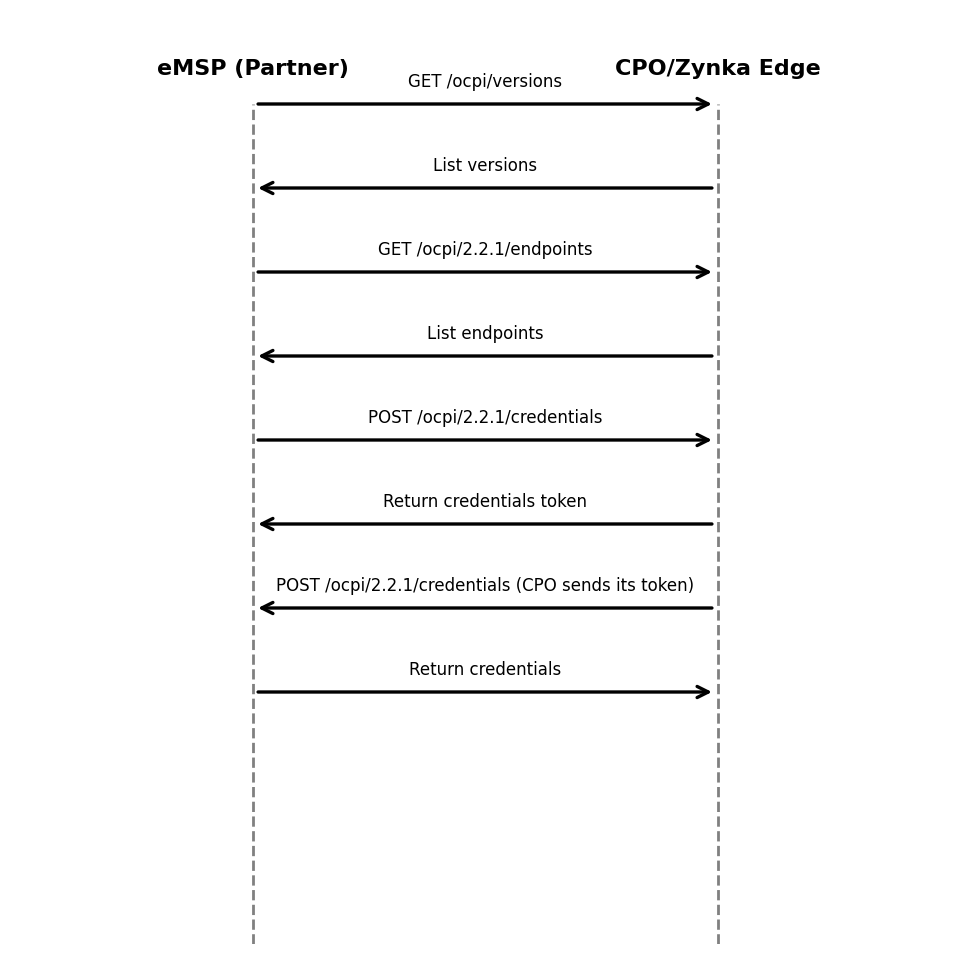
Version discovery
An eMSP begins by requesting the list of supported OCPI versions from the CPO:
GET /ocpi/versions HTTP/1.1
Host: cpo.example.com
The CPO responds with an array of version objects containing the version string and the URL for the version details. The eMSP selects version 2.2.1 and fetches the endpoints using the returned URL:
GET /ocpi/cpo/2.2.1 HTTP/1.1
Host: cpo.example.com
The version details response contains endpoint definitions (Credentials, Locations, Sessions, Tariffs, Commands, etc.) with their roles (sender/receiver). Each endpoint is namespaced by the operator’s country code and party ID.
Credentials exchange
Credentials must be exchanged before any other module can be called. The OCPI specification mandates that tokens used in the Authorization header are Base64 encoded and uniquely identify the party【343458627312853†L1861-L1881】. If an authorization header is missing or unknown, the server should return an HTTP 401 error【343458627312853†L1861-L1881】.
The typical flow is:
- Generate a token – Each party generates an API token and base64‑encodes it.
- Send credentials – The party with the sender role (e.g. a CPO when connecting to a hub, or an eMSP when connecting peer‑to‑peer) performs a
POST /ocpi/credentialscall containing its credentials (token, URL, roles). This call uses HTTP Basic auth with the receiver’s token in theAuthorizationheader. The body includes your token and the list of roles you play in this connection. - Store partner credentials – Upon receiving credentials, the receiver stores the partner’s token and roles and returns its own token in the response. Both sides now have each other’s tokens and can call the other’s endpoints.
- Verify connectivity – Each party may perform a test
GETon the partner’s versions endpoint using the exchanged token to ensure that authentication is configured.
Always send unique X-Request-ID and X-Correlation-ID headers with every call for traceability. The Gireve implementation guide notes that X-Request-ID uniquely identifies each request and X-Correlation-ID allows correlation across micro‑services【826352846409834†L1224-L1240】.
Roles and URLs
OCPI endpoints are namespaced by the sender’s country_code and party_id. For example, if your CPO identity is IN/ZYN, your Locations endpoint will be:
https://api.zynka.one/ocpi/cpo/2.2.1/locations/IN/ZYN
A client cannot access objects belonging to another party; if it tries to push or fetch an object with a different country code or party ID, the server may return HTTP 404 to block access【343458627312853†L2131-L2140】. When pushing client‑owned objects (e.g. locations, tariffs, sessions, CDRs), ensure that the object ID in the URL matches the id field in the body. Discrepancies should yield OCPI status code 2001【343458627312853†L2131-L2140】.
In the next section you’ll learn how to exchange tokens (whitelist) and how to authenticate customers at the charge point.