💸 Direct Payment & UPI Integration
Zynka ONE extends standard OCPI roaming with a Direct Payment flow that lets drivers pay on‑the‑spot without a subscription. It combines the EVRoaming Foundation (EVRF) Direct Payment module and India’s Unified Payments Interface (UPI) to deliver a seamless “scan–pay–charge” experience.
Overview
The Direct Payment module allows a Payment Terminal Provider (PTP) to integrate card readers or QR‑code flows into an OCPI network. Drivers can pay with a contactless card or UPI and immediately start charging. The module introduces new objects such as Terminal, StartSession and Financial Advice Confirmation. Each charging session is tied to a unique authorization reference (often the payment token trace number); this reference must be echoed in the resulting Session and CDR【661383774245363†L1749-L1783】.
Zynka ONE implements Direct Payment on top of its existing Commands and Sessions pipeline. Payment terminals are registered with Zynka ONE and assigned to one or more Locations. When a driver scans a QR code or taps their card, the terminal reserves a pre‑authorization, initiates a charging session, and later confirms the final cost. UPI support means drivers can use any UPI app—Paytm, PhonePe, Google Pay, etc.—without downloading a dedicated charger app.
Payment terminals & assignment
Payment terminals are managed by the PTP. Terminals are identified by a uid and may be assigned to multiple Locations. The EVRF spec specifies that:
- Terminal creation: Only the PTP may create terminal objects. The CPO (Zynka ONE) can read terminals using
GET /payments/terminalsand update assignments usingPUT /payments/terminals/{uid}【661383774245363†L581-L588】. Each assignment lists thelocation_ids(OCPI Location identifiers) that this terminal serves【661383774245363†L592-L600】. - Location exchange: The PTP must pull all locations assigned to its terminals from the CPO to map location data to its internal identifiers【661383774245363†L592-L600】.
- Multi‑EVSE support: A single terminal may serve multiple EVSEs across different locations. The PTP is responsible for presenting the correct tariff based on the selected connector【661383774245363†L646-L657】.
Zynka ONE exposes these endpoints as part of /ocpi/2.2.1/payments/* with authentication and pagination behaviour identical to other OCPI modules.
Transaction flow
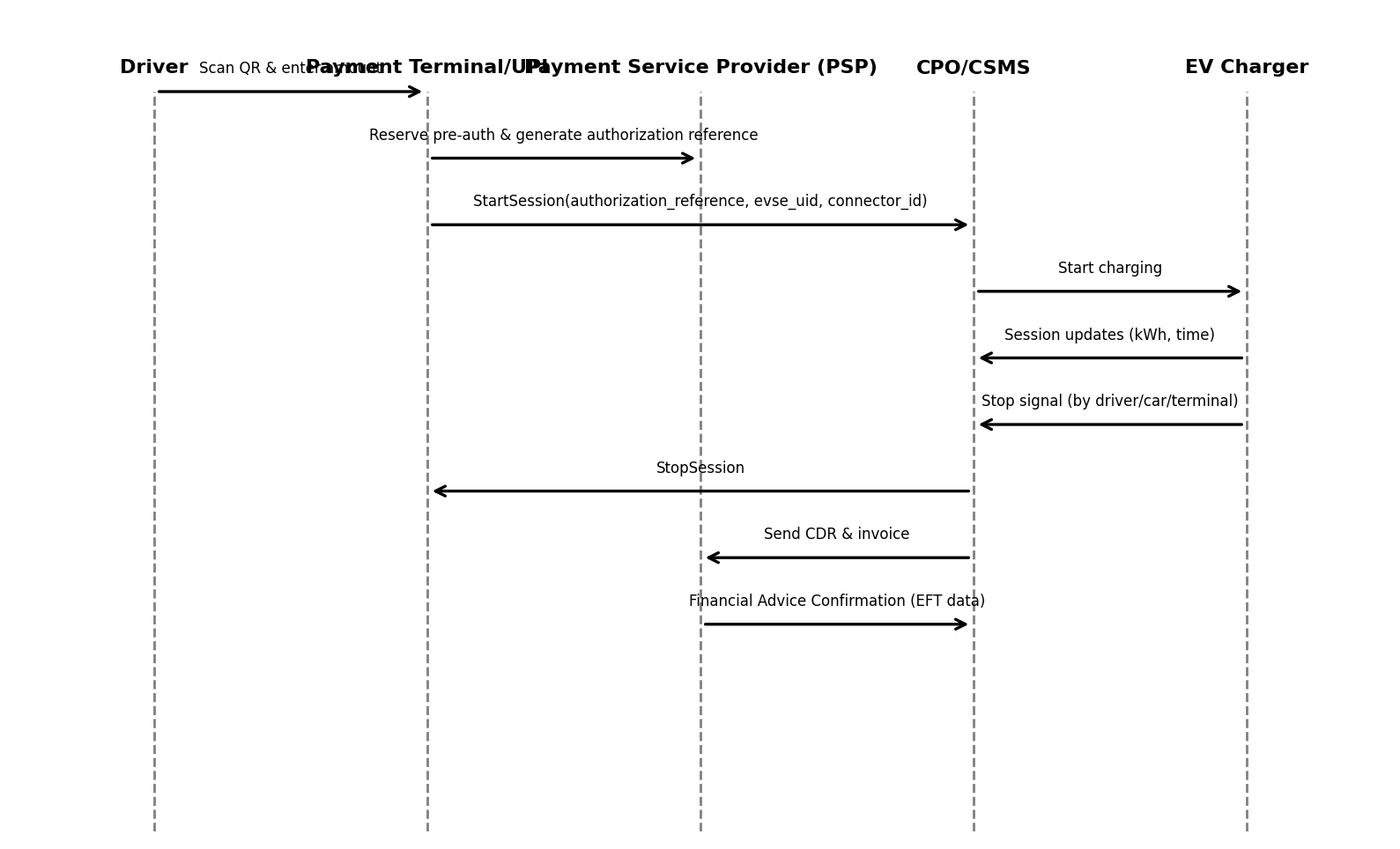
When a driver arrives at a charger with Direct Payment enabled, the following sequence occurs (simplified):
- Scan & pre‑auth: The driver scans a QR code or taps their card on the terminal. The terminal communicates with its Payment Service Provider (PSP) to reserve a pre‑authorization limit (e.g. ₹1,000) and obtains an authorization reference【661383774245363†L606-L637】.
- Display tariff: The terminal fetches the current connector information and associated tariff ID from Zynka ONE. The tariff and pre‑auth limit are displayed on the terminal. The driver confirms.
- StartSession: The terminal sends a
POST /commands/START_SESSIONto Zynka ONE. The request body includes theevse_uid,connector_id, the driver’stoken(if available), and the authorization reference【661383774245363†L606-L637】. Zynka ONE starts charging and creates a Session. - Session updates: Throughout the charge, the charger or vehicle sends updates (energy, duration) to Zynka ONE. These updates are pushed to the PTP so it can display progress and compare against the pre‑auth limit【661383774245363†L606-L637】.
- StopSession: The session may be stopped by the driver, the car, the station (e.g. battery full), or the terminal when the pre‑auth limit is reached. The terminal issues a
POST /commands/STOP_SESSIONreferencing the Session ID【661383774245363†L606-L637】. - CDR & invoice: Once the session ends, Zynka ONE generates a Charge Detail Record (CDR). If the CPO handles invoicing, it includes the price and tax calculations. If the PTP generates the invoice, it must send a Financial Advice Confirmation to the CPO with the actual cost and EFT data (payment transaction details)【661383774245363†L646-L657】.
The following sequence diagram illustrates the high‑level interactions:
UPI & app‑less payments
India’s Unified Payments Interface (UPI) allows any user to transfer money instantly between bank accounts using a mobile app. Integrating UPI into EV charging eliminates the need for proprietary apps or RFID cards. Evidence from multiple sources shows the benefits:
- Scan, pay and charge: EV owners can initiate charging sessions using any UPI app by scanning a QR code displayed on the charger. They enter the amount and complete the transaction; no dedicated charging app or card is required【64818879343632†L90-L105】.【746950747585479†L185-L193】.
- No app downloads or credentials: The process removes the need to download multiple eMSP apps or share personal information. Users don’t have to remember different login credentials【64818879343632†L100-L104】.
- Pre‑payment visibility: The pre‑payment amount is written on the station—similar to fuel pumps—and is shown on the charger’s screen and in the app【64818879343632†L114-L117】【746950747585479†L212-L219】. This transparency improves trust and reduces billing disputes.
- Instant confirmation and wider reach: Reliable Charge notes that scanning a QR code via UPI provides quick, secure payment with instant confirmation; users don’t need to load funds into a dedicated wallet and can pay directly from their bank account【817253353510106†L108-L120】.
- Broader customer base: UPI integration allows operators to reach customers who might not have a credit card or prefer not to sign up for roaming services. EVreporter highlights that operators benefit from a broader base without requiring users to install specific apps, potentially lowering costs【64818879343632†L119-L121】.
Zynka ONE uses the Direct Payment flow to tie UPI transactions to an OCPI session. When the driver scans the QR code, the terminal generates an authorization reference (the UPI transaction ID or paymentTokenTraceNo). This reference is passed in the START_SESSION command so that the subsequent Session and CDR include it【661383774245363†L1749-L1783】. The unique reference allows reconciliation between the payment and energy delivered.
Implementation guidelines
To implement Direct Payment and UPI integration on Zynka ONE:
- Register terminals: Coordinate with your Payment Terminal Provider to create terminal objects and assign them to OCPI Locations. Pull terminal lists regularly to stay in sync【661383774245363†L581-L600】.
- Unique authorization reference: Use the PSP’s trace number or UPI transaction ID as the
authorization_referencein theStartSession. This must be unique and should be included in Sessions and CDRs【661383774245363†L1749-L1783】. - Present tariffs clearly: Before starting a session, display the applicable tariff and any pre‑auth limit on the terminal. Tariffs should come from Zynka ONE’s
/tariffsendpoint and remain immutable during a session【826352846409834†L1437-L1454】. - Monitor pre‑auth: Track energy delivered versus the reserved amount. Stop the session when the pre‑auth limit is reached to avoid overcharging the user【661383774245363†L606-L637】.
- Send Financial Advice Confirmation: If your PSP generates the invoice, send a
POST /payments/financial-advice-confirmationswith the actual cost and EFT details to Zynka ONE after the session ends【661383774245363†L646-L657】. - UPI compliance: Follow the National Payments Corporation of India (NPCI) guidelines for QR codes. Ensure transaction values are displayed clearly, and provide receipts via SMS or in-app notifications.
By combining EVRF Direct Payment and UPI, Zynka ONE delivers a flexible, interoperable payment experience that works across networks and apps. Drivers simply scan, pay and charge, while operators maintain full control over sessions, tariffs and billing.